Before installing Adsense, there may arise a few questions in users’ minds. Let us go through them one by one. Where does the money come from? Many of the users think about the fact, that who is paying the money for your ads? Google does not make the payment for them. It is the advertising company or the advertisers, who make payments for those ads. The content of the website should be in accordance with the advertising company. Then the advertiser agrees to place the ads on your website, and you may earn a part of the profit. Moreover, Google also has its personalized automatic system, which can track the performance of the published advertisements. If the advertisements published are more visited by the customers, Google will place more high paying advertisements on that particular website. Google intends to look after the advertiser’s interest and performs its task accordingly.How to convert your website into a high earning platform? Also Read: Important 12 Steps to Do Before Applying for Google AdSense
How to earn money from your website? The content of the website must be properly chosen and inserted in accordance with the products or services. If you own a removal company, your website must contain blogs related to removal industry. The potential keyword should be included in your blogs/articles, and proper keyword research is to be done. You can use Google Adwords to select the best keywords for your blogs/articles. Without authentic and high researched content, your website would not get a high page ranking in the search engine. Keeping your website content fresh and regular updating of the content is another important aspect to get high search engine ranking. Hence, if you are keen to make money from Adsense, build your website using informative and plagiarism free content.
Also Read: Top Important Ways to Make Money without Google Adsense How to place the ads on the website? Most of the users have great difficulty in understanding the placement of ads. They should be positioned very cleverly, in the websites, either on the top or bottom so that the content of the website is clearly readable. If the complete website page is filled with ads, the visitor will lose interest in clicking on those ads, and the website may lose its popularity. Placing navigational links on your website is the most traditional method of placing ads. By acquiring a proper knowledge of ads placement, your website will get more visitor’s attention.
The leading advertisement network Google Adsense has changed its policies for the Adsense account approval. Earlier, getting AdSense account approved was very easy. All you needed was to apply for AdSense through blogspot or youtube and use it on any other websites you want.
That was very easy process but people started misusing it. After getting AdSense they started using it in low quality and spamming blogs. So, Google decided to make a big change to their AdSense policies as mentioned in their official blog. There are now two types of AdSense account. The first one is AdSense hosted account and the second on is non-hosted AdSense account. Here’s the difference between AdSense hosted and non-hosted account.
What is Adsense Hosted Account?
AdSense hosted account is the one that is approved by partner sites of Google such as Blogspot, YouTube or HubPages. So if you have an approved account from there, it will be known as Adsense Hosted Account. When you want to publish their ads to the non-hosted website i.e yourblog.com, then you are required to submit the request to upgrade your account from hosted to non-hosted. Getting approval of hosted account is comparatively easy to the normal account. In this type, you do not have your own domain. You have to go through the proper application procedure and place the desired website’s URL to the show ads on your website.
What is Adsense Non-hosted Account?
AdSense non-hosted account is the one which you can use on any website that you own even if your account is on domains like .com, .net or .org. However, getting a non-hosted Adsense account is not that easy anymore because many people tried to trick AdSense to get approved so they changed the policies. You have to fulfil all the requirements of AdSense to get approved. When you apply for the normal Adsense account, you are required to have the quality blog or website which is according to AdSense requirements. Their team will review your account manually. You need to get the approval before you start placing your ads on other websites otherwise your ad place will appear white. In case, if you don’t get the approval from Google AdSense. You can always try back until you finally get approved for the non-hosted account. Here I’ll show you how to upgrade your AdSense hosted account into non-hosted. Make sure that to read my post on things to do before applying for AdSense.
Things To Do Before Upgrading AdSense Hosted Account:
Before you submit your request to convert your AdSense hosted account into fully approved non-hosted account. Here are quick tips for you.
Add the main pages like About us, Contact us, Privacy policy on your blog.
You must have the top notch domains like .org and .net.
The applicant must be above 18.
When you are above 18, then you can use your name as the payee same as on your bank account.
Inscribe the content of high quality and do not forget to optimize it with the right keywords for the search engines.
Your website must have a good design, swift and speedy loading.
Have a sophisticated looking website theme.
Read more in detail…
How To Upgrade AdSense Hosted Account?
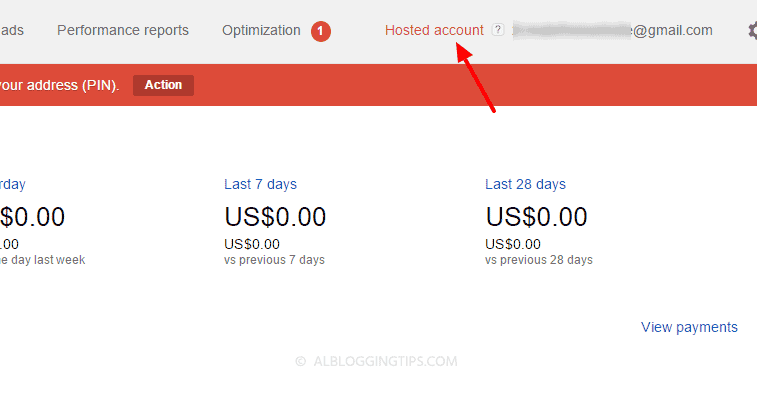
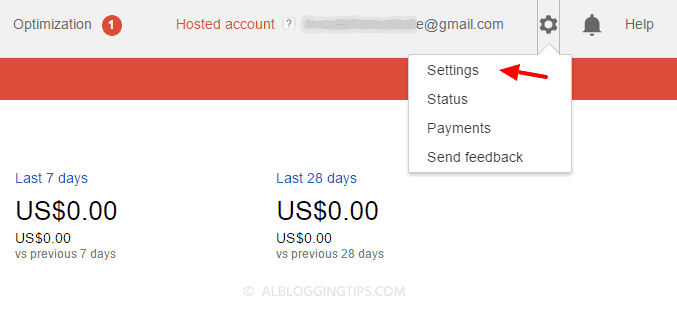
So here is the process to convert AdSense hosted into non-hosted account. The first thing to do is to get the quality website. The Google team has changed the process into 2 steps. You have to submit the request for the upgrade, your account will be reviewed, you will implement ad and then the AdSense team your account again and you will be get approved or disapproved. Step 1: Sign into your AdSense account. Step 2: On the top right, you will see the gear icon. Click that and select settings. Step 3: On the left side select Site “Access and authorization” section and select Site authorization. Step 4: On the “Show ads on other websites” page that appears, enter the URL of the site where you plan to show ads.
Step 5: Click Submit.
Now after submitting the application, you’ve to add the AdSense code in the blog you submitted in above step. Step 6: Add AdSense code to your website
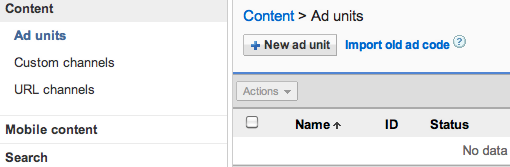
Sign into your AdSense account. Now visit the My ads tab.
From the sidebar, choose “Content.”
Click +New ad unit button.
In the next step enter the name of your ad and customize it.
View details about the settings.
Click Save and get the code.
Now create a new HTML widget in your blog sidebar and add AdSense code that you generated in the step mentioned above.
Done. Google will manually review your application. It can take few days or week.
What to do if the application is disapproved?
You’ll get an email about approval or disapproval. Even if your application is rejected, don’t worry. You will be able to use Adsense on hosted sites like Blogspot or Youtube. You can always try again and again until you get approved You can also try other ad networks. I recommend Infolinks and Bidvertiser. Are you using Google Adsense? Is it hosted or non-hosted fully approved account? If you have any other questions, feel free to ask me in comments. Thanks and stay blessed!