Showing posts with label google adsense. Show all posts

Wednesday, 17 May 2017

How to get an AdSense account approved faster?


Google AdSense! One of the most easiest, trusted and professional way of earning money by showing your passion towards writing and sharing the knowledge. Google AdSense is trusted by many advertisers and publishers from the past few years, and usually they never accept anyone randomly who is trying to apply for an account. You need to show them the most professional approach of getting your account accepted, else Google will simply throw your application aside.
Statistics say that Google AdSense accepts only 3 accounts of every 1000 applications they receive each day. If you are trying to get onto the account or has been rejected earlier, follow these simple guidelines to get your own AdSense account in just 3 simple days. Though these below tips won’t get you the account approved instantly, but will surely work if you try inheriting each step mentioned below. I’m sure it worked for 60% of people who commented here and mailed me from the past couple of years.
Get Google AdSense Approval Within 3 Days:
So before getting started, make sure you follow these guidelines without fail, else your application will be rejected without any further pending approval. Remember that everything which I mentioned below counts. Don’t compromise on number of posts, own domain, good design and other metrics, else the chances of rejection is higher at your end. So here we go, the 15 most important guidelines to follow before applying to Google AdSense.
Minimum Posts/Articles/Pages:
If you are using WordPress, make sure your website/blog has at least 40 quality articles which are not copied from anywhere else. Your content on the articles should be extremely rich and make sure you use relevant images where ever required. Try to include two lengthy articles of 2000 words each, which should be absolutely stunning while anyone reads them on your website. If you are using HTML website or any other non CMS version of blog, make sure you have atleast 50 pages on your website in form or articles or landing pages.
If you miss providing this any of the above information on your website, Google might reject your application saying Insufficient Content or Unacceptable Site Content. So make sure they see enough content on your website before applying the program. The more the content, the better chances of approval.
Prohibited Website Niches:
Statistics show that your account will go through a faster approval process if you have more quality articles on Health, Internet Marketing, Business, Law, Technology, Entrepreneurship, Travel, Lifestyle and Social Media. Google will take your application as a serious offense if your website contain any of the prohibited content mentioned in this link here.
Some studies have also proved that Google AdSense might reject your approval if your website is on event blogging and micro niche blogging. In this particular blogging, you limit your blog content to only one particular subject and create a spam domain around it to rank higher. Eg: http://www.mayweathervspacquiaom... (Mayweather vs Pacquiao Match Online). In some cases, if you have observed Google Ads in these of websites, probably they have applied the account through an another account and placed the ads in this event niche blogging to earn quick money.
No Third Party Ads or Programs:
Before applying to AdSense, make sure you don’t allow or place any other third party banner ad code on your website. Google (employees) will strictly look into your website manually and they hate seeing some third party ads installed in your website. Stay away from Infolinks, Chitika, Yahoo Ads or any other third party network to get the first impression clean on your website. Make sure you put only the fresh content and some regular widgets on the website.
Also, stay away from affiliate links such as hosting programs, Amazon affiliates, Clickbank or anyother until your account is approved.
Website Design and User Experience:
Google always want their users to get the best experience while browsing through any website they refer. Maintaining a clean design with good navigation and user experience will boost your chances of getting AdSense approved in the first attempt itself. This is one of the major guidelines where lot of people miss the basics. Google believes that if you maintain professional color scheme on your website, the user might be willing to come back and click on the relevant ads which are displayed under your content.
So make sure you maintain a neat and clean design before applying to AdSense. I would recommend you to buy one professional template anywhere and get it installed on your website without effecting the loading speed or easy navigation.
Google Analytics Code:
Adding Google Analytics code on your website is a trusted factor for the approval. Adding Analytics onto your website show that you are actively tracking your visitors and is much serious about the statistics of your users who visit your website. If you haven’t created one, click here to register the program. Once registered, get your tracking code by creating new account under the accounts tab and enter your website name, URL and other required details. Place the code on each page of your website to track the data instantly.
Google/Bing Webmasters Verification Page:
Just like Google Analytics, you need to even verify with Google Webmaster program, which has the complete access to your website in search perspective. With Google Webmaster Tools, you can track your website critical errors and fix them on a daily basis. Click here to register and click on “Add a Site” to enter your website URL. Verify your website ownership through any of the recommended method and complete the process to keep your account functioning actively.
Also, adding the Bing Webmaster Tools to your website will add more credibility to your domain that you are serious about the website search visibility. Though this guideline is pretty easy to perform, many people will get comfortable without knowing the importance of installing these tools.
Adding these two verifications on your website code or server will show good results on search visibility as well.
XML Sitemap Page:
Creating a sitemap doesn’t take too much of your time. If you are using WordPress, I recommend Google XML Sitemaps By Arne Brachhold. And if you are using any other platform, I recommend you to checkout XML-Sitemaps website for more info. Installing a sitemap on your website can help search engine bots to index your website faster, which is again a trust factor to bots about the website trustworthiness.
Robots.txt
Creating Robots.txt file on your website will get rid of indexing unwanted junk onto Google. I have written a detailed post few days back on how to write perfect robots.txt for your website. Else you can also check Search Engine Techniques by an SEO Expert From India own robots.txt file and simply copy it to your WordPress website. I have restricted all the unwanted data indexation to search engines, which adds a lot of value to your SEO efforts of ranking the pages higher on Google. Plus, robots.txt file is another great feature to add it your website as a trust factor.
Alexa Rank:
Google AdSense considering the Alexa rank has always been a controversy, as many people disagree that Google doesn’t care about your global rankings. Trust me, I strongly believe that this is one of the most important checklist any manual operator checks before even opening your website statistics. How can anyone quickly judge about a website performance? The answer is simple, and its Alexa ranking. So make sure you install the Alexa toolbar and read my eBook on how to boost Alexa ranking within 30days.
Note: Before applying to AdSense, make sure your website global Alexa ranking is less than 400K for faster approval process. Usually the website above this rank is considered to be new and underestimated that no much data is seen on them.
Important Pages:
Google wants to know your identity before you signup to their AdSense program. So make sure your create the following pages on your website as soon as possible.
  1. Privacy Policy
  2. Disclaimer Policy
  3. Terms of Usage
  4. Contact Us
  5. About Us (Write your name and address through which you applied the AdSense account)
In the about us section, clearly mention who you are, and why is this website made for, what is the benefit people get out of your website. The more clear, the better the chances of your approval. Keep your spelling mistakes, grammar and punctuation clear when you do this.
Custom Domain and Email ID:
A lot of people get create websites through blogspot and free WordPress platforms to apply AdSense. Note that AdSense team will take a custom domain more seriously rather than the free domain name. Investing 2$ on a domain name is not a big deal when you have health chances of getting approval with other factors like mentioned above. So don’t give yourself a second chance to apply the AdSense program and get your own domain as early as possible.
Once you have your own domain, create an email ID with your name (name@website.com) to apply the AdSense program. Eg: info@bscitbooks.comwill get more attention compared to bscitbooks0@gmail.com. Note that your free website programs give you the privilege or adding your custom domains without paying any additional fee.
Decent Traffic:
Though a lot of portals, forums mention that Google AdSense doesn’t require any certain amount of pageviews to approve your account, I still feel and experienced the treatment if you have a decent traffic. Let your blog age a few weeks (atleast 2 months) before you rush to apply the AdSense program. I would always recommend you to stay until your website get a minimum of 50+ visitors per day. If your website is not getting enough traffic, the chances of rejection is much higher when compared to other guidelines.
Once your website is ready with all these above guidelines, click here to apply to Adsense, and make sure you have gone through the Google AdSense TOC for more information on the program.
Leave your comments to check if your doing good with the process. And if your AdSense was rejected despite of following all these above mentioned guidelines, shoot me a mail to info@bscitbooks.com and I will help you out with a free AdSense consultation. Stay tuned to my profile for more such interesting topics!
Also, I have made a step by step video guide on how to apply Adsense if you are looking for more information. Check out the below video and let us know if you still have trouble in getting your account approved.
For more : Inspire Space

Tuesday, 22 November 2016

How to Earn Money From Your Website Using Google Adsense?

Before installing Adsense, there may arise a few questions in users’ minds. Let us go through them one by one.

Where does the money come from?
Many of the users think about the fact, that who is paying the money for your ads? Google does not make the payment for them. It is the advertising company or the advertisers, who make payments for those ads. The content of the website should be in accordance with the advertising company. Then the advertiser agrees to place the ads on your website, and you may earn a part of the profit. Moreover, Google also has its personalized automatic system, which can track the performance of the published advertisements. If the advertisements published are more visited by the customers, Google will place more high paying advertisements on that particular website. Google intends to look after the advertiser’s interest and performs its task accordingly.How to convert your website into a high earning platform?

Also Read: Important 12 Steps to Do Before Applying for Google AdSense

How to earn money from your website?
The content of the website must be properly chosen and inserted in accordance with the products or services. If you own a removal company, your website must contain blogs related to removal industry. The potential keyword should be included in your blogs/articles, and proper keyword research is to be done. You can use Google Adwords to select the best keywords for your blogs/articles. Without authentic and high researched content, your website would not get a high page ranking in the search engine. Keeping your website content fresh and regular updating of the content is another important aspect to get high search engine ranking. Hence, if you are keen to make money from Adsense, build your website using informative and plagiarism free content.   

Also Read: Top Important Ways to Make Money without Google Adsense

How to place the ads on the website?
Most of the users have great difficulty in understanding the placement of ads. They should be positioned very cleverly, in the websites, either on the top or bottom so that the content of the website is clearly readable. If the complete website page is filled with ads, the visitor will lose interest in clicking on those ads, and the website may lose its popularity. Placing navigational links on your website is the most traditional method of placing ads. By acquiring a proper knowledge of ads placement, your website will get more visitor’s attention.

Friday, 7 October 2016

What are some amazing facts about Google & Microsoft?

The “I’m Feeling Lucky” Button Costs Google $110 Million a Year!

Ever notice that ubiquitous “I’m feeling lucky” button on the Google homepage that you've probably never used. What if I told you that this small little piece of grey rectangle, costs Google over 110 million dollars a year!
That’s right! What this button effectively does, is that it takes the user directly to the top search result for that query thereby bypassing all the other top 9 results and also the ads that get displayed alongside them. Brin was recently quoted as saying that almost 1% of all Google searches go through the “I’m feeling lucky” button and that costs the company around $110 million in annual revenue.

So why doesn't Google take it off? Well, it just did but in such a sneaky way that you probably didn't even notice.  It’s still there on the homepage but thanks to Google Instant, you don’t get to use it anymore!
Try it and see for yourself.


Thanks and stay blessed!

Friday, 17 June 2016

How to submit your Blogger Sitemap to Google | InspireSpace


Sitemaps are text files containing a list of all web pages that exist on your website and are accessible to crawlers and users. These helps visitors and search engine bots to find pages on website. Sitemaps are a way to help Google indexing pages on your site which otherwise might not be discovered. 

If your blog is hosted on blogspot.com (or if you are using a self-hosted version of Blogger with a custom domain) you will be surprised to find out that the default sitemap file, contains only the 26 most recent pages of your blog which in normal case should contain all URLs of a website.
Many webmaster pretend to teach others how to drive traffic to blogs or websites yet leaving out the most important factors like sitemaps. There are still other websites who keep on providing the old methods of generating a sitemap for blogger which are not any effective.

How to add a complete Sitemap for your Blogger Blog

Step 1: If you haven't done this already, sign-in to your Google Webmasters account and add your blog. For details, check this tutorial on how to add a blog to Google.

Step 2: Once your blog is added to Google, go to Webmaster Dashboard  and click on your site address

Step 3:  On the left panel choose Crawl > Sitemaps - then click on the Add/Test Sitemap button.

Add each of the following codes:

/atom.xml?redirect=false&start-index=1&max-results=500
/atom.xml?redirect=false&start-index=501&max-results=500
/atom.xml?redirect=false&start-index=1001&max-results=500

If your blog have lots of pages, add the sitemaps below:

atom.xml?redirect=false&start-index=1501&max-results=500atom.xml?redirect=false&start-index=2001&max-results=500
atom.xml?redirect=false&start-index=2501&max-results=500
atom.xml?redirect=false&start-index=3001&max-results=500

Thanks and stay blessed!

Wednesday, 15 June 2016

5 Easy Ways to Improve the SEO of a blog or Website & Boost Traffic


improve seo, seo tips, boost traffic
Boost traffic & increase SERP visibility with SEO

A blogger needs to know at least the minimum on SEO. For it, you don't need to be an SEO expert but you need to know the minimum so that your posts are well indexed in the search engines.
The phrase "content is king" is one of the widest spread Internet memes being used by so many bloggers, with the idea that you should focus on having quality content, while the rest don't matter much. This is not true. Quality content is important, but it shouldn't be the only concern of a blogger today. In addition to producing quality content, your text needs to be optimized for the search engines.
Now, let's see what would be the basics that any blogger needs to learn about SEO and other simple SEO knowledge. Below are 5 easy tips to improve the SEO of your blog:


1. Define the keyword

When you write a post, it is recommended to choose the keyword (or term) suitable for your text. What you want is that this keyword - or term - to be searched on Google, and then get your post among the top. For this, you need to use this keyword a few times in the text.

For example, here the keyword could be SEO, but this term is too generic and I could hardly get in the top for this search. Then I'll work with a phrase or a long tail keyword, so that this post will rank for the term "easy ways to improve the SEO of a blog". I will use this phrase a few times, but without overdoing it.


2. Use the keyword in the post title

Now that I have defined the keyword, I will use it in the post title. This step is very important, and certainly will help you to get a better rank in search engines. As you can see, what I have in the title is the easy ways to improve the SEO of a blog keyword, along with other words to form an attractive and optimized title for SEO.


3. Use the keyword in the H2 tags

You must also use heading tags (h2, h3) in your posts. Here, I am using the keyword "easy ways to improve the SEO of a blog" in a H2 heading. Do this always, because it also helps to become well positioned in the search results. If you don't know or don't understand what are the heading tags, I would suggest to do a further research on this subject.
use keyword in h2 tags


4. Use the keyword in the text

Make use of your chosen keywords throughout the text. Especially in the first paragraph (please note that I have repeated the title in italics in the first sentence). But be careful when doing this, there is a maximum and minimum limit for that. A good keyword density is between 1.5% to 4.5% for best results. Less than that will have no effect and more than that can alert the search engines and your text might be considered spam.


5. Publish Posts with 300 words or more

Posts under 300 words have little chance to be among the top results in search engines. Of course, you will be able to rank for multiple keywords that are less popular with less than 300 words, but for the most competitive keywords that have the potential to bring a greater number of visits, it will be nearly impossible.

Thus, it is recommended to write posts with more than 300 words. It's not hard when you really understand the topic you're talking about.


Conclusion

As you can see, with some simple SEO techniques you can improve the traffic coming to your blog from the search engines. I hope you enjoyed these 5 easy ways to improve the SEO of a blog!

Thanks and stay blessed!

Tuesday, 14 June 2016

Top Important Ways to Make Money without Google Adsense


You adsense is BANNED ? Why your blog if you don’t have adsense ?

I know you are thinking the same as I mentioned above  But to be honest I don’t like adsense too much that’s reason I removed adsense from this blog. But if your don’t have adsense than you don’t need to worry about that as today we are discussing Top 5 Ways to Make Money without Adsense..

The dominance of Adsense in the ad serving market has seen it assuming tyrannical stand with the rejection rate for ad publishing applicants deplorably higher. However, with a plethora of other earning options available, there is no cause for heartbreak for gullible users.

We discuss top five sparkling alternatives to make money without adsense here. ;)

Make money through Affiliate marketing

Affiliate marketing can become a veritable cash cow if capitalized upon ethically. One is required to promote the products of merchants or entrepreneurs and bag a handsome commission on each sale made at an attractive 20-70% depending upon the financial strength of the merchant. Superior quality products with strong brand presence, credibility and potential to deliver what is promised should be vigorously promoted through blogs, writing high quality articles, building a massive email list, participating in discussions on serious forums and writing product reviews. Low quality products should never be promoted through spamming and illegal blackhat techniques or one will face serious loss of reputation with fatal repercussions.


Make money selling ad spaces


Blogs dedicated to promoting high end products are sure to attract the attention and interest of marketers who would like serious audiences for their products on their sites. Selling banner ad spaces on blogs for a niche product with promise of diverting good amount of organic traffic will bring one a handsome chunk of income. The share of revenue will be comparably higher than Adsense as Ad networks sell the advertising space on blogs at about a whopping discount of 90% to marketers owing to profuse amount of selling space available with them. The potential advertiser should be allowed to offer their best price to fetch higher revenue and make money without adsense.

Use OIO Publisher plugin for WordPress to sell ad spaces with ease.


Make money Using Best Adsense Alternative


Adbrite and Chitika have emerged as the best alternatives to Adsense when it comes to displaying context sensitive ads. Their payouts are highly competitive. Adbrite shares the revenue in 75-25% in favor of blog owner. Chitika is the leading impulse merchandising company which gets the niche ads displayed through customized and novel ad boxes that deviate radically from accepted industry standards and complement the existing ad serving scenario. Chitika is the golden geese for ad publishers and the platform can be capitalized to earn daily ad revenue. The action based pay per call ads pay to publishers somewhere between 2 to 20 dollars per action. Adbrite and Chitika have offered unsuspecting users a new avenue to make money without adsense.

Here are best adsense alternatives that pays!

Bidvertiser
Chitika

Make money by Writing Paid Reviews


Millions of people across the globe read blog posts every day. A company can generate tons of qualified traffic and have the spotlight on its products when it pays for paid reviews to be posted in context sensitive blogs pertaining to their niche products. This triggers word of mouth advertising, enhances link popularity, brand credibility and product exposure and also provides a chance to understand peculiar consumer tastes and behavioral trends. Ultimately the product page experiences a significant rise in search engine rankings. The companies pay handsomely to have their reviews covered in blogs with significant number of qualified visitors. One can earn amounts equivalent to that of adsense and this is slowly turning out to be a better alternative to make money without adsense.

Here are best websites you should join to get paid reviews offers quickly.

ReviewMe
PayPerPost

Make Money by Using In Text Ads


Publishing ‘In text ads’ on your blog by invoking the services of Infolinks will help in monetizing the site with highest revenue share from contextual in text ads. Only relevant ads are delivered which essentially improves the conversion rate and boosts the earning potential. You can join following sites to monetize blog using in text ads;

InfoLinks

The pay per click ads can be easily integrated in the site and bring about a jumpstart in your earning and a new opportunity to make money without adsense.

Download FREE eBook : Google Adsense Secrets Revealed

What you’ll get?

Things to do before applying for Adsense

 How to really get approved by Adsense fast

 Making passive income via Adsense

 Click here and Enter your details to download the eBook

Don’t forget to share your methods to make money without google adsense

Thanks and stay blessed!

Monday, 13 June 2016

Important 12 Steps to Do Before Applying for Google AdSense


So, you want to apply for Adsense to make some money from your blog and enjoy the life you always dream of?

Who does not anyway? That’s the dream of every blogger to get AdSense approved.
But, wait I’ve to tell you something.
That’s not easy. Google AdSense is very strict when it comes to approving new application. Everyone is trying to trick AdSense to get approved so they have made the process very hard.

Don’t worry. You’re not alone.

In this article, I’m going to share with you everything that you need to do before applying for Google AdSense program to actually get approve.


Some common questions that you may have about Google AdSense are…

How to apply for Google AdSense?

Does my blog qualify for AdSense or not?

Am I eligible to apply for Google AdSense?

What are Google AdSense requirements?

Why Google AdSense rejected my application?

What to do if Google AdSense reject my application?

This post is going to answer all your questions in detail. It’s over 4000+ words so grab a cup of coffee.. ;)

WHY GOOGLE ADSENSE IS SO POPULAR?

Google AdSense is one of the oldest networks to offer ad publishing and works at Pay Per Click system.

When it comes to the legitimacy of Google AdSense, it speaks for itself. Google AdSense have thousands and thousands of satisfied customers and publishers. AdSense pays on time, every time.

One more reason for choosing Google AdSense is that we can earn huge amounts of money if we do our work in right way. There are many bloggers who are making a complete living from their blogs and Google AdSense.

Therefore, Google AdSense should be the number one choice among all the other available networks.

It’s paying rates are better than all of other networks so that’s the biggest reason it is so popular among bloggers.

But since everybody is running behind them, they have made the approval system very strict. You make little mistakes and get disapproved every time. Here are few reasons why Google will reject your AdSense application.

COMMON ADSENSE REJECTION REASONS

Here are the most common rejection reasons and Google AdSense requirements that you should keep in mind before we get into details.

1.  Insufficient content / Unacceptable site content

Your website doesn’t have enough text on for Google specialists to review.

Google gives a lot of value and attention to the content of the blog before accepting it. If the content is poorly written and has grammatical mistakes Google will reject the blog right away.

Not only the content needs to be grammatically correct, it must be unique and has to provide value to the users and readers of the blog. So the number one reason is the poorly written content on your blog.

2. Page Type / Design of your blog

What will you do if you land a page with full bright yellow background with white text on it, having huge buttons all over the place?

Yes, you’ll never visit that website again .

Blogs which are poorly designed and are hard for the visitors to understand gets rejected by Google AdSense. You must have a good and neat design which comforts the eye and is beautiful in the look.

3. No Privacy Policy, About Us or Contact Us page

There are some pages which you must have before applying to Google AdSense if you want to get accepted.

These are about us, privacy policy and contact us pages. These pages give the impression that you are a professional and that you are working according to the Google policies. Keep in mind that having a privacy page is also one of the requirements for Google AdSense.

4. Site Does Not Comply With Google AdSense Policies

No rich, unique and meaningful content, no organic traffic, pages with little to no original content or bad user experience through clear navigation and organization.

Your website may be the one that drives traffic through illegal sources, sites with excessive keywords or poorly coded design are usually rejected.

So you need a complete guidance and list of things that you need to do before applying for Google AdSense.

THINGS TO DO BEFORE APPLYING FOR ADSENSE

1. Write High-Quality Content:

The #1 thing you need to do before applying for Google AdSenseis to write high-quality content. This is very important thing which you can’t ignore at any cost. I mean it!

Google loves the blog who are providing high-quality content and their visitors are enjoying it. Keep in mind that your application will be reviewed by humans and you have to impress them to get approved by AdSense.

A high-quality content…


  • is unique and original
  • with proper headings and bullet lists
  • free from grammar and spelling mistakes
  • is long enough
  • useful and informative


2. Create Privacy Page for Your Blog:

One of the common mistakes that most new bloggers. Even though there are people out there who say that having a privacy policy for a blog doesn’t make sense but they are wrong!

The first thing you will need to apply for Google AdSense and get approval is the privacy policy of your blog or website. If you don’t have it you cannot get approval simple is that.

Why is it important?

It’s requirement of AdSense and secondly, this privacy policy means you are not a scam and gives the sense of a serious business. Google will check the rest of the conditions only if you have this policy.

A privacy actually describes to your readers about what they will get on your blog , what they should do and what they should not. So obviously there is nothing bad in having a privacy policy. While it can affect somehow on your AdSense approval, you must give it a try.

You can write it yourself or find Privacy Policy Generators online (You don’t need a lawyer anyway).

3. Create About Page:

Like privacy policy, you must have an about page so that you can get approved. This also shows that there is a real person behind the blog.

An About page has a major role and importance even if you don’t want to apply for AdSense. But when it comes to AdSense, they are about zero chances of getting approved if you are not showing this page.

About page simply describe you and your blog . This will not only help you establish a relationship with readers but it will also make them trust you.

4. Setup A Contact Us Page:

It’s quite obvious that everyone has his/her own opinion.

What one of your readers likes may be bothering someone else. Then it is better to give them an opportunity to speak up to you and tell how they feel about your blog, what they want to be edited , what they liked or hated.

Create a contact page, if possible add your email that you are going to apply for Google AdSense. If possible do get some professional email address like admin@inspirespace.in


By creating this you are telling Google that we care for our customers, visitors and we are ready to help them. They can contact us anytime.
It will also show the Google AdSense Team that is viewing your site that you actually care about your readers and not only the money and AdSense.
Check out my contact page to get some idea.

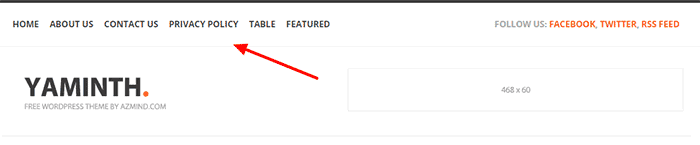
One important step: Google AdSense mention in their rejection email that your website should have a clear navigation menu to help your readers find your pages and access the content before you think about applying again for AdSense.

So, what you’ve to do is to work on your menu by adding all important categories and pages i.e about us, contact us and privacy policy to help your readers easily find the content that they are looking for. The more you care about improving your visitors experience the higher chances will be to get approved by AdSense.

Here’s an example to illustrate this point.
add important pages to adsense

5. Verify Your Name and Email:

When you apply don’t forget to put your name and email address in some easily visible area like about and contact pages. It will confirm to Google AdSense team that it is the same person who applied for AdSense and not some spam, crappy bots.

This will speed up the verification process and within no time, you’ll be able to enjoy fully approved AdSense account.

6. Have Some Good Number Of Posts:

What should be the minimum number of posts before applying for Google AdSense? There is no confirmed answer.

Not even one.

Because I have seen very established blogs with 300+ posts and their owner telling me that Google AdSense is rejecting them while somewhere bloggers with few posts or even less than 10 are enjoying making money with AdSense.

Exactly, what I said that there is no actual answer. However, we can always predict things.

According to my experience, the best time to apply for AdSense account is when you have at least 20 good quality posts. Your blog posts length should be at least 600+ words with quality content.

Dillon got his AdSense account approved with just 3 posts, 115 views, and 2 comments. Isn’t that great?

I visited his blog and noticed these things that actually matters to get Adsense approved.


  • Simple and clean design
  • Easy to navigate blog
  • Unique niche
  • Detail content
  • No “unwanted” widgets


7. Make Sure You’re 18+

This is the mistake that new bloggers are making who are less than 18. They write incorrect age and get into trouble.

Use your correct date of birth and age while applying for Google AdSense account.

Because Google AdSense is not for people who are under 18. Some people realize this problem after being disproved a few times without any legitimate reason.

So I advise you to be accurate while typing your age.


8. Improve Your Blog Design:

As mentioned earlier, you blog design matters a lot. It should be professional and not like a messy photo gallery. A clean, professional and fast-loading design is appreciated by Google.

When you visit a website what’s the first thing you look for? It’s blog design.

You’ve to build a good first impression on your blog readers to engage them.

Your blog design is the biggest thing after content. This represents your expertise, experience, and professionalism. It should have following features:


  1. Simple and professional
  2. Easy to navigate
  3. Proper menus
  4. No useless items in sidebar or footer
  5. Search engine friendly
  6. Fast loading
  7. So be careful because anything can kill your chances of getting approved by AdSense.


There are thousands of websites who provide free professional looking themes for your blog. All you need to do is to search for them.

If you’re on WordPress self-hosted blog then I recommend getting a premium theme from MyThemeShop.

And if you are still using blogspot then there are many great websites where you can find free professional looking blogger templates for your blog.

Check out my post on the reasons to invest more money on your blog.

9. Check Your Content Type:

Be careful with what type of content you are publishing. Because it is something that truly matters.

Here are some common content types that are not accepted by AdSense.


  • Pornography/Adult materials
  • Pirated Content
  • Hacking or Cracking Tutorials
  • Illegal Drugs/Paraphernalia
  • Any Other Illegal Stuff
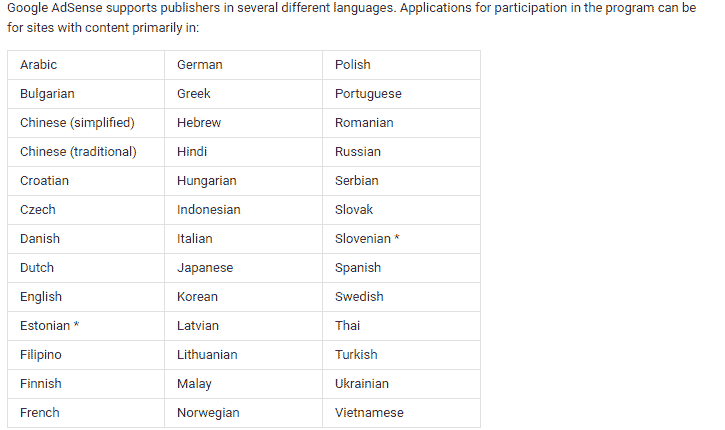
  • There are few languages that are supported by AdSense so make sure your blog language is in the list of these.

AdSense supported languages
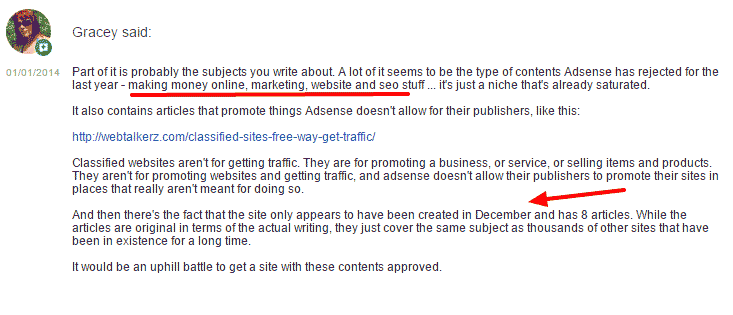
Google AdSense team mentioned in one of their forum posts that they stopped accepting niches that are already saturated i.e making money, marketing, website and SEO stuff. You can read more here.
Please-review-my-site-for-Google-Adsense---Google-Product-Forums
If you already have written about these content that AdSense doesn’t support, you can either stop dreaming about AdSense or get rid of these content.

10. Use Top Level Domain:

Google has made changes to their policies. If you have a blog with blogspot and the domain is yourblog.blogspot.com then chances are you will get approved quickly.

But you will not be able to use that on any other domain like .com. You’ll have to submit the request to upgrade your AdSense account.

As for today, you must have your own unique domain that specifies your blog. If you don’t have one yet, stop dreaming about getting approved with sub domains and go buy a Top Level Domain. It will cost anywhere from $10-$15/year. You can buy the domain from Godaddy or Namecheap.

The best domain is the one with .com extension. Choose a short, unique and easy to remember domain that is related to your blog niche.

Another important thing about the domain is its age. Because for some of the Asian countries like India, AdSense has placed domain age restriction. They don’t accept any sites which are less than 6 months old.

There are many AdSense stories that I read on many forums that some people got approved for few weeks old blog and other got rejected for the blog that is even more than 6 months old. So age doesn’t really matter when you have a high-quality blog that’s focus more on helping your visitors.

If you’ve a website that is less than 6 months old then you can still consider applying for AdSense.

11. Remove Other Ad Networks:

If you have any other ads placed like Chitika, Infolinks, Clicksor or anything, it’s time to drop them off.

Make your blog free from ads.

Even Google AdSense allows you to use other ad networks along with them, it’s better to remove the ads before applying and don’t put them back until you get a reply from AdSense team which usually takes anywhere from few days to weeks.

So, before submitting your application for Google AdSense make sure to remove all the ads on your blog from any other network.


12. Check Your Traffic Sources:


Google hates the sites that are getting paid traffic and mostly penalizes them so there is not a damn chance of getting approved by AdSense for a site that is getting paid traffic. You can bring traffic from search engines or any other way you want but if you want to earn via Google AdSense the right way, paid traffic is not a solution.

Also, note,that Google does not accept site which gets traffic from illegal sources. So focus on getting traffic from legal sources like social media, search engines, and related blogs.

WHAT TO DO IF YOUR APPLICATION IS REJECTED?

Okay, so you had done trying everything you could to get approved by AdSense.

But, AdSense is still not getting approved.

Well, It’s not the end of the world! ;)

There are two things you can do:

#1: Don’t lose hope. Take your time to fix the issues on your blog that is mentioned by AdSense in rejection email and apply again. Remember, if you are disapproved, you can apply again and again until you finally get approved by Google AdSense. There’s no issue with that. Just use the same email account that you used for the first time.

#2: There are many other trusted and high paying ads network you can use and trust me they are not hard as Google AdSense is in terms of getting approval. One door of opportunity is closed so the other one will open.

You can use these ad networks to earn money without AdSense. They are easy to get approved.
 Bidadvertiser and Infolinks.

CONCLUSION:

To sum up, getting an AdSense approved is not really hard if you have a quality website that is focused more on high-quality content, optimized for search engines, uses a great design and with the good number of visitors. Because that’s what Google wants from its every publisher.

Make sure to do these things before applying for Google AdSense. I guess these are not too hard. Don’t be sad if Google AdSense doesn’t approve your blog. There are many other ways to make money online without AdSense.

Hope for the best.

One more thing, don’t reply too much on AdSense. Try to make money through your blog from other business models. Ads network will not give you much as other income methods like affiliate marketing and selling your own product.

Now here’s what I want YOU to do.

Click on social sharing buttons below and share this post with your friends, I’m sure they’ll love it!
Comment below and let me know your story about getting AdSense approved. If you have any questions feel free to ask.

Thanks and stay blessed!

How To Upgrade AdSense Hosted to Non-hosted Account


upgrade adsense hosted account

The leading advertisement network Google Adsense has changed its policies for the Adsense account approval.

Earlier, getting AdSense account approved was very easy. All you needed was to apply for AdSense through blogspot or youtube and use it on any other websites you want.

That was very easy process but people started misusing it. After getting AdSense they started using it in low quality and spamming blogs.

So, Google decided to make a big change to their AdSense policies as mentioned in their official blog. There are now two types of AdSense account. The first one is AdSense hosted account and the second on is non-hosted AdSense account.

Here’s the difference between AdSense hosted and non-hosted account.

What is Adsense Hosted Account?

AdSense hosted account is the one that is approved by partner sites of Google such as Blogspot, YouTube or HubPages. So if you have an approved account from there, it will be known as Adsense Hosted Account.

what is adsense hosted account


When you want to publish their ads to the non-hosted website i.e yourblog.com, then you are required to submit the request to upgrade your account from hosted to non-hosted.

Getting approval of hosted account is comparatively easy to the normal account. In this type, you do not have your own domain.

You have to go through the proper application procedure and place the desired website’s URL to the show ads on your website.

What is Adsense Non-hosted Account?

AdSense non-hosted account is the one which you can use on any website that you own even if your account is on domains like .com, .net or .org.

However, getting a non-hosted Adsense account is not that easy anymore because many people tried to trick AdSense to get approved so they changed the policies. You have to fulfil all the requirements of AdSense to get approved.

When you apply for the normal Adsense account, you are required to have the quality blog or website which is according to AdSense requirements. Their team will review your account manually.

You need to get the approval before you start placing your ads on other websites otherwise your ad place will appear white. In case, if you don’t get the approval from Google AdSense. You can always try back until you finally get approved for the non-hosted account.

Here I’ll show you how to upgrade your AdSense hosted account into non-hosted. Make sure that to read my post on things to do before applying for AdSense.

Things To Do Before Upgrading AdSense Hosted Account:

Before you submit your request to convert your AdSense hosted account into fully approved non-hosted account. Here are quick tips for you.


  • Add the main pages like About us, Contact us, Privacy policy on your blog.
  • You must have the top notch domains like .org and .net.
  • The applicant must be above 18.
  • When you are above 18, then you can use your name as the payee same as on your bank account.
  • Inscribe the content of high quality and do not forget to optimize it with the right keywords for the search engines.
  • Your website must have a good design, swift and speedy loading.
  • Have a sophisticated looking website theme.
  • Read more in detail…

How To Upgrade AdSense Hosted Account?

So here is the process to convert AdSense hosted into non-hosted account. The first thing to do is to get the quality website. The Google team has changed the process into 2 steps. You have to submit the request for the upgrade, your account will be reviewed, you will implement ad and then the AdSense team your account again and you will be get approved or disapproved.

Step 1: Sign into your AdSense account.

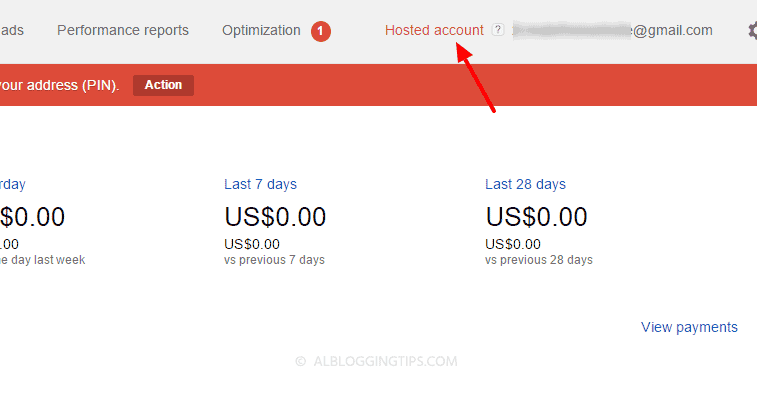
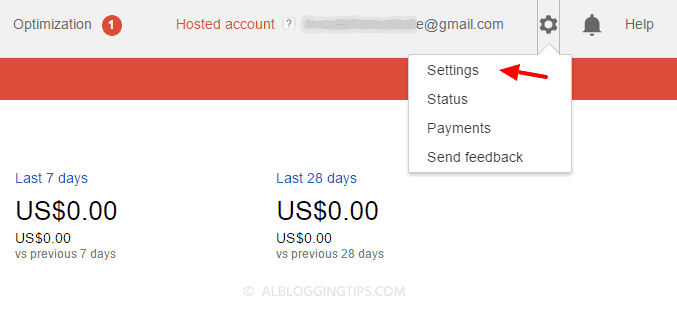
Step 2: On the top right, you will see the gear icon. Click that and select settings.
step one to convert hosted adsense account

Step 3: On the left side select Site “Access and authorization” section and select Site authorization.

Step 4: On the “Show ads on other websites” page that appears, enter the URL of the site where you plan to show ads.


Step 5: Click Submit.

Now after submitting the application, you’ve to add the AdSense code in the blog you submitted in above step.

Step 6: Add AdSense code to your website


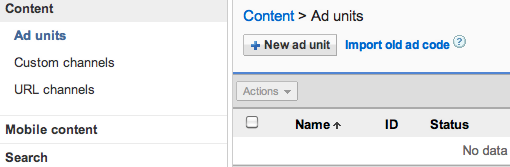
  1. Sign into your AdSense account. Now visit the My ads tab.
  2. From the sidebar, choose “Content.”adsense hosted account
  3. Click +New ad unit button.
  4. In the next step enter the name of your ad and customize it.
  5. View details about the settings.
  6. Click Save and get the code.
  7. Now create a new HTML widget in your blog sidebar and add AdSense code that you generated in the step mentioned above.


Done.

Google will manually review your application. It can take few days or week.

What to do if the application is disapproved?

You’ll get an email about approval or disapproval. Even if your application is rejected, don’t worry. You will be able to use Adsense on hosted sites like Blogspot or Youtube. You can always try again and again until you get approved

You can also try other ad networks. I recommend Infolinks and Bidvertiser.

Are you using Google Adsense? Is it hosted or non-hosted fully approved account?

If you have any other questions, feel free to ask me in comments.

Thanks and stay blessed!

Saturday, 4 June 2016

The 10 Important URLs That Every Google User Should Know


The 10 Important URLs That Every Google User Should Know

Which websites and apps have access to your Google account? Where do they store your searches and location history? These 10 links will reveal everything Google knows about you.
What does Google know about the places you've visited recently? What are your interests as determined by Google? Where does Google keep a list of every word that you've ever typed in the search box? Where can you get a list of Google ads that were of interest to you?